Listed in topic: Installing
Importing & Exporting
WordPress
IntenseDebate offers the best comment synchronization for WordPress. All of your previous WordPress comments will automatically be imported into IntenseDebate, while all comments made in IntenseDebate will be synced back into your WordPress comments. This ensures that you will always have all of your data in your database. Learn more about our WordPress Plugin and data synchronization.
Exporting↑ Table of Contents ↑
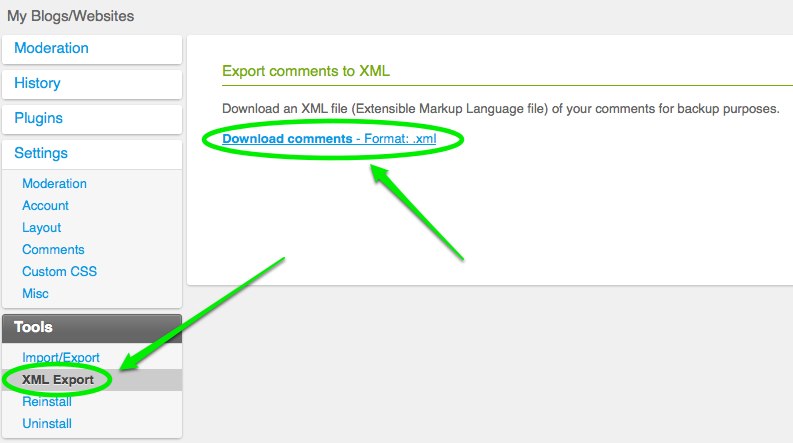
With IntenseDebate you can export all of your comments in an XML format. To export your comments and all comment data, visit your IntenseDebate account > select your blog from the “My Sites” tab in the top menu > select the “XML Export” link in the sidebar > select “Download comments – Format: .xml”. Please note that we do not currently offer a way to import an XML file.
Tags: blogger, export, import, JSON, wordpress, XML — Can't find your answer here? Let us know.
Last modified: May 15, 2015 by Michael
Help us improve:
We're always looking to improve our documentation. If this page didn't answer your question or left you wanting more, let us know! We love hearing your feedback. For support, please use the forums or contact support form. Thanks!
You must be logged in to post a comment.
 Company
 IntenseDebate Support